Saturday, 21 July 2018

Canon Pixma TR8550 review

Canon Pixma TR8550 review


The majority of Canon’s Pixma inkjet printers are geared toward printing great photos, like the impressive six-ink Canon PIXMA TS8050, but the Canon Pixma TR8550 is aimed squarely at the home office. As such, it has only five (rather than six) ink cartridges and adds a document feeder and duplex printing. The inclusion of a fax facility, puts this machine in the competitive category of compact four-in-one MFPs. At around £199 (about US$265,AU$355) it is quite keenly priced. 

And this model really is compact. Canon reckons it is 38% smaller than the MX920 it replaces, while retaining two separate paper trays front and rear and a 20-sheet ADF on top. What Canon offers that the average MFD doesn’t, is a large 4.3-inch touchscreen interface, Bluetooth connectivity in addition to Wi-Fi and a fifth ink cartridge to enhance the print quality.   

Design

Printers for the home office have been getting progressively smaller and the Canon Pixma TR8550 is a prime example. With all of the flaps and extending trays folded away, it’s little bigger than Canon’s family oriented photo printers and yet it incorporates a 100-sheet main paper tray, a 20-sheet rear paper tray for photo paper and envelopes and a 20-sheet automatic document feeder (ADF) on top.

It looks smart and sophisticated with the extra-large touchscreen taking up most of the front panel and you probably wouldn’t begrudge this unobtrusive printer sharing your desk.
SPEC SHEET
Here are the full specs of the Canon Pixma TR8550:
Type: Multifunction colour inkjet printer
Functions: Print, copy, scan, fax   
Ink: Five cartridges  (C, M, Y, BK, PGBK) 
Paper size: A4   
Connectivity: Ethernet, Wi-Fi, USB, Bluetooth   
Data storage slot: SD Card slot   
Print speed: 15ppm (mono), 10ppm (colour) 
Main paper tray capacity: 100 sheets    
Print quality: 4,800 x 1,200 dpi 
Duplex: Yes   
Scan quality: 1,200 x 2,400 dpi   
Apple AirPrint: Yes   
Google Cloud Print: Yes 
App support: iOS/Android 
Consumables included: 5 ink cartridges     
Size/weight: 190 x 438 x 351mm (HxWxD)/8kg

Features

Features
The Canon Pixma TR8550 is a four-in-one, which means the print, scan, copy and fax boxes are all ticked, this is a feature-rich machine and Canon has done well to include luxuries like a 4.3-inch touchscreen and Bluetooth connectivity for the money.

Bluetooth compliments the inbuilt Wi-Fi and makes it even easier to ensure a stable wireless connection with a smartphone so that you can use the handy Canon Print companion app, while the touchscreen makes it easy to use and monitor at a glance.

Instead of four ink cartridges, there’s an extra pigment black to improve text and photo quality. You can tell this printer was made by a Camera brand because it also has an SD Card input and can connect to Canon cameras wirelessly via PictBridge.

Essential features such as duplex printing and connectivity with cloud services like Dropbox are present too, which means the only items missing are NFC connectivity (although Bluetooth makes up for this) and a front USB port. 

Setup and operation 

The 10.8cm colour touchscreen might seem an unnecessary extravagance for a printer, but the asking price for this model is still low and it certainly makes installation and operation easier than it would have been without it. Getting started is simply a case of following the instructions and printing out the test sheets when prompted. You have five cartridges to fit instead of four.
The touchscreen proves its worth when you have to type in the password to your Wi-Fi network. It’s not a sensitive as your smartphone’s screen, or course, but it’s quicker than the fiddly hard buttons you usually have to contend with. The screen is also great for switching between paper stock and monitoring the status of your current print job at a glance.  
The Canon Print app is also very helpful when it comes to scanning and printing. Canon uses the app to offer its own cloud printing service, although this takes some time to set up. 
HOW WE TEST PRINTERS
Each printer we source for testing is measured on our test bench and the results are critically compared with every other model we have reviewed. Rather than relying on the manufacturer’s quoted figures, we time the first page out and print speeds in single sheet and duplex mode using a standard ten-page document and a stopwatch app. To compare print quality, we print out the same set of test documents on every machine. These twelve test pages include text of varying font sizes and colours, mixed image and text pages, a set of photos and a series of test patterns designed to assess sharpness, colour fidelity, contrast and grey scale. 

We also calculate running costs, compare functionality and consider each product’s versatility, design and build quality. The overall score reflects all of these parameters and overall value for money.

Performance

We found the Canon Pixma TR8550 to be rather slow when it came to printing mono duplex pages of text, but the pages were worth waiting for. The additional cartridge delivers black pigment ink in addition to the four dyes, which gives printed words a rich darkness, while maintaining a delicate touch. Very small point sizes are just as clearly defined as large letters.

The extra ink also befits colour documents, with colours appearing vivid and well contained and blacks, evenly filled in throughout. Photographs on photo paper are particularly well shaded, accurate and colourful. Well what did you expect from a camera manufacturer. Presumably it is because the print resolution is only half the DPI of the Canon PIXMA TS8050 that photos look noticeably softer. It also lacks the additional grey cartridge of that model’s six-ink system.

By adding a fax and ADF and keeping the cost low, some sacrifices in print quality have been made. Despite this, the Canon Pixma TR8550 turns out mono, colour and photo prints that will impress. 

Final verdict

The size and style of this surprisingly compact printer will endear it to anyone who works in a cramped office, while that enormous 4.3-inch touchscreen makes everything from setup to checking your workflow at a glance, just a little bit easier.

The Pixma TR8550 ticks off all of the features a home office might need including duplex printing, separate paper feeds for plain and photo paper and an ADF. Bluetooth, in addition to Wi-Fi, ensures an easy connection with the helpful Canon Print app and that extra ink cartridge gives every text document a crisp and bold finish, while photos appear rich and vivid.

By adding a fax and ADF to what looks very much like the Pixma TS8050 photo printer, the Pixma TR8550 gains some bulk while compromising its print quality. It is also rather expensive to run, with that additional black pigment cartridge meaning that you have to buy five, rather than the usual four replacements. 

For the money, and we’ve seen some significant discounts on this model already, the Pixma TR8550 has a lot to offer. To begin with, the compact size is an achievement given that it has three separate paper feeds, five ink cartridges and a huge 4.3-inch touchscreen display. It also offers the essentials such as duplex printing and sending high-resolution scans to the cloud via a companion app. It also prints mono, colour and photos in great quality. Like many cartridge-based inkjets, however, replacement ink is expensive.

Tuesday, 15 May 2018

Tuesday, 24 April 2018

RHA T20i review

RHA T20i review


Good sound is subjective, yes, but there are things that we can all agree on that make a headphone sound good: Bass should be tight and impactful, highs detailed but not harsh, and mids that are smooth like honey. 
Most headphone manufacturers shoot for these specs, but what if you want a little more bass or want to increase the energy of the highs? For most headphones, your only option is to mess with equalization. But RHA has a different idea. 
The RHA T20i is an excellent sounding pair of in-ear headphones with a neat party trick: customizable filters. These filters thread into the headphone housings and let you choose from Bass, Treble, and Reference. Each filter makes an audible impact and are easy to swap out on the go. 
As a package, the build quality, sound, and customizable filters make the RHA T20i a must-have for audiophiles on the go. In fact, they sound so good, they made us want to give up our wireless headphones.

Design

The RHA T20i feature a black anodized aluminum finish paired with an all black cable and headphone termination. The RHA T20 (which doesn’t have a mic) comes in a nice silver if that’s more your style. 
The earphone drivers look and feel bulletproof and feature ear hooks with memory wire. This makes the T20i extremely comfortable as you can mold them to fit around your ears and stay there. The over-ear design generally helps cut down cable noise - but you’ll notice the noise if you’re walking or working out. (To their credit, RHA includes a shirt clip to combat cable noise, but it’s a hassle.) 
The headphones feature an in-line mic and remote that works with iOS devices. Android users are out of luck as the T20 doesn’t have a remote. However, if you do have an iPhone, you can control volume, playback, and make calls, which came through loud and clear with our friends and family.
Both the Y-splitter and 3.5mm headphone termination are made out of anodized aluminum as well, which means the headphones can take some serious abuse. To prove they've thought of everything, the 3.5mm headphone jack also features a spring to take the force off the cable to prevent fraying. While it would have been nice to see a replaceable cable, the cable the T20i comes with is so beefy that we doubt listeners will have to replace them short of a catastrophic accident. 
Included in the box are a ton of ear tips to help you find the perfect fit. They’re stored in a nice metal frame and the headphones also come with a nice leather case to help you carry around the filters, shirt clip and eartips. We loved the double flange tips but accidentally ripped them taking them on and off repeatedly to switch filters, so be careful. 

Performance

Listening with the Reference filter, the RHA T20i sound truly phenomenal. Bass hits hard and is always controlled. Highs are sparkly with excellent resolution, but never harsh. Mids sound liquid and balanced. The Reference filter is by far our favorite of the three included filters for its balance and versatility between genres. 
Switching over to the Bass filter, we expected the headphone to increase bass emphasis but it didn’t. Instead, the bass filter dulled the highs and brought out more of the mid-bass frequencies. Bass-heads will be disappointed that the headphones don’t make skull-rattling bass, but this is a headphone for serious listening. 
The High filter brought more energy to the highs but didn’t take away from the mids or bass, which is nice. We found the High filter slightly too harsh for the highs but it can help with tracks that could use a bit more treble energy. 
After spending several weeks with the RHA T20i, we found ourselves going back to the Reference filter and ditching our wireless headphones to enjoy the improved sound during our commute. Sure, wireless headphones are much more convenient, but the RHA’s sound quality is worth the hassle of going wired. 
 

Saturday, 10 February 2018

Tuesday, 23 January 2018

 Aurvana Headphones review

 Aurvana Headphones review


If you haven’t been keeping up with the in-ear headphone scene these last 12 months, you’ve missed an awful lot - including our favorite new earphones, the 1MORE Triple Driver: for $99 (£85, AU$179), they offer about the best sound you’re going to get from a pair of earbuds due, in no small part, to the triple driver array packed inside each earbud. 
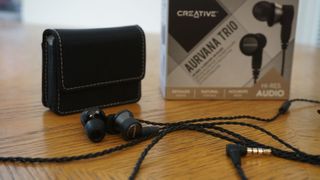
But, as it turns out, 1MORE isn’t the only company with a compelling triple-driver headphone on the market. Creative has just announced a pair of its own called the Aurvana Trio, part of its premium line of Hi-Res audio products and, despite being a bit pricier than 1MORE’s earbuds, they give the Triple Drivers a fight for their lives.
So which one should you buy? Well, after weeks of comparing the two triple-drivers side-by-side, ultimately, we have concluded that you can’t go wrong with either of these exceptionally balanced, immaculately crisp in-ears. 

Design

Before we dive too deep into the sound quality of Creative’ Hi-Res headphones, it’s worth going over what exactly triple-driver headphones are and why they’re so much better than the single driver headphones you’re used to hearing.
In simplest terms, the words ‘triple-driver’ refer to the triple driver array inside each earbud. 
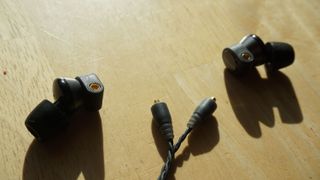
Why three drivers instead of one? Two precision balanced armature drivers deliver clear mids and highs, while one bio-cellulose driver exclusively replicates accurate and powerful bass - i.e. instead of one driver that’s forced to produce all areas of sound simultaneously, triple driver headphones divide and conquer the audio spectrum, often with spectacular results. More to the point, these headphones have a measured frequency response of 5 to 40,000Hz, or about double what the human ear is capable of hearing. 
While the sound quality is substantially better with triple driver headphones, the trade-off here is that they might be a bit larger than the earbuds you’re used to wearing. Because they’re a bit larger and protrude from the ear a bit more than you’re used to, they’re not exactly what we’d consider low-profile or necessarily the kind you’d want to use while laying bed. That said, to aid in making them as comfortable as possible, Creative at least packs four pairs of replacement tips in every box, including one pair of foam eartips that better conform to the shape of your inner ear and help seal out noise. 
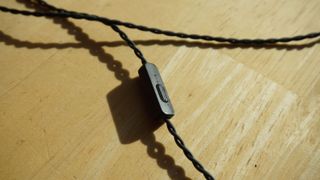
Connecting the earbuds to the right-angle 3.5mm jack is a braided cable that drastically reduces cable noise and, as an added bonus, is completely replaceable once it begins to fray. On it, you’ll also find a universal inline remote with a built-in mic and controls for pause/play. It’s a bit plastic-y in our opinion, but thanks to a replaceable cord, that’s something that could change easily in the next iteration of the headphones.

Performance

While the design of the headphone enables the possibility of better audio quality, it would all be for naught had the headphones actually sounded less than perfect. Thankfully, they sound just as good if not better than the design promises. 
With crystal clear mids, rollicking warm highs and hearty, controlled bass, Creative’s Aurvana Trio is one of the best-sounding in-ear headphones we’ve ever tested. It packs astounding clarity in nearly all areas, helping you pick up on small guitar flourishes or cymbal rolls in places you hadn’t heard them in the past and, most of the time, can even help you distinguish between MP3 and uncompressed WAV files. (Try it for yourself here.) 
We could wax poetic about the clarity and sound reproduction that smoothes out even the lowest-resolution music in your collection, but the proof is in the pudding as they say. A 5 to 40,000Hz frequency response should help cover the highs, lows and everything in between, and supremely light design keeps them in your ears for hours without fatigue. 
That last part is key here: While we’ve heard great-sounding in-ears in the past, they’ve usually been too bulky to wear for long periods. While there are some minor compromises to be made here - we couldn’t get a 100% noise-cancelling seal with our pair of earbuds - the Trios are supremely comfortable. They’re the kind of buds you can bring with you on the subway, around town or just wear them lounging at home, and they’ll sound great in nearly every scenario.  

Verdict

If you have the money for some truly spectacular in-ears, the Creative Aurvana Trio are well worth their $249 (about £180, AU$300) sticker price. They’re darn comfortable, sound great and offer extreme clarity in nearly all areas of the audio spectrum. If $249 feels a bit too far out of your price range at the moment but the idea of a triple driver headphone sounds appealing, don’t miss the still-phenomenal 1MORE Triple Driver Headphones. 

Monday, 8 January 2018

Beelink A1 TV Box review

Beelink A1 TV Box review


Computers come in various shapes and forms: portable laptops, monstrous desktop or gaming PCs, and miniature HDMI dongles, or even some that are integrated into a keyboard or a wall power plug.
WHERE TO BUY?
Online Chinese retailer, Gearbest, sent us the sample and sells the Beelink A1 for just under £47 (around $64) at the time of writing. Note that, while this price includes delivery, it is exclusive of any taxes that may be levied by HMRC or the courier companies on behalf of the vendor. Want to buy tech from online Chinese retailers? Read this first
The Beelink A1 is sold as a TV box, as the name indicates, but is just as useful – if not more – as a thin client, especially for small and medium-sized businesses that may want to move away from expensive and complicated Windows-based setups to embrace the cloud. 

Design

The A1 is absolutely tiny and will comfortably sit in an adult hand. Its dimensions (76 x 76 x 17mm) mean that it can be hidden almost anywhere, but the lack of a VESA mount means that you won’t be able to fix it securely to a monitor.
The manufacturer opted for a white finish all round except for the base which is bright orange. The device’s plastic shell means that the bill of materials can be kept to a minimum while ensuring adequate heat dissipation thanks to an aluminum heatsink just under the surface.
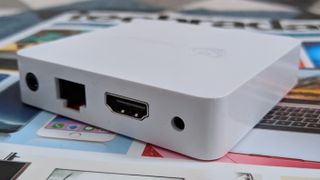
The front is adorned with a white LED display which provides the time and system status at a glance, which can come in handy. Despite its size, the A1 manages to cram in two full-size USB ports (one of which is USB 3.0), one microSD card reader, one full-size Gigabit Ethernet port, a full-size HDMI port and an audio jack.
SPEC SHEET
Here is the Beelink A1 configuration sent to TechRadar Pro for review:
CPU: Rockchip RK3328
Graphics: Mali-450MP2
RAM: 4GB
Storage: 16GB
Ports: HDMI, Ethernet, microSD, USB 2.0, USB 3.0, audio jack
Connectivity: 802.11n Wi-Fi, Bluetooth 4.0
OS: Android 7.1
Size: 77 x 77 x 17mm (W x D x H)

Specifications

Bearing in mind that this is a sub-£50 box, we were surprised to find that it had 4GB of RAM (albeit DDR3), something that will definitely be helpful for future versions of Android, or if you intend to run more memory-hungry applications.
Beelink opted for a quad-core CPU – a Rockchip RK3328 – clocked at up to 1.5GHz. It supports 4K at 60Hz, H.265 and VP9 formats as well. The choice of the Mali-450MP2 remains unexplained as it is a GPU that is nearly six-years-old, and doesn’t come with architectural improvements found on later models.
The small storage capacity (16GB) is probably the only worry, although the presence of a microSD card slot mitigates our concerns – note that the thin client also sports 802.11ac Wi-Fi connectivity and Bluetooth.
As expected, the A1 is powered by a 5V2A (10W) power supply unit with a proprietary connector. We’d have preferred a microUSB affair as it would have allowed portable battery chargers to be hooked up to the device.

Buy link from a website: gearbest

Thursday, 28 December 2017

Sunday, 24 December 2017

RHA MA390 Universal In-Ear Headphones review

RHA MA390 Universal In-Ear Headphones review


While wired headphones may be way of the dodo with disappearing headphone jacks, there are still plenty of reasons to go wired. Two of the biggest reasons is sound quality and price. While there are cheap wireless headphones out there, they sound much worse than wired headphones for the same price. 
In the budget in-ear headphone category, you usually sacrifice sound and build quality for price. However, there are rare gems that are affordable, sound great, and are built well. The RHA MA390 is one of those headphones. 
While the RHA MA390 is the cheapest headphone the company makes, it doesn’t sacrifice on build quality, design, or sound: These headphones are beautifully crafted out of aluminum, feature a braided cable, and a universal remote that works with Android and iOS. While not perfect, the RHA M390 are an excellent value in the budget in-ear category.
RHA MA390

Design

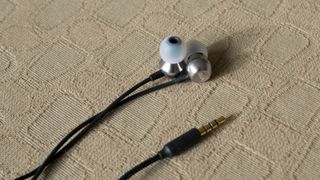
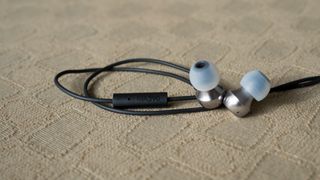
The RHA MA390 do not feel like $30 (£20, about AU$39) headphones. Its driver housings are milled out of solid pieces of aluminum into a trumpet shape. While its slightly more expensive sibling, the RHA S500u, have smaller driver housings, the MA390 are still quite compact and light for comfortable listening. 
The RHA MA390 features a braided cable that resists tangling as well as a straight 3.5mm headphone termination. You can tell where RHA cut costs with the MA390 versus the S500u as the headphone jack on the MA390 is rubber instead of aluminum. 
Like the S500u, the RHA MA390 feature a universal remote control. Click it once to pause, double click to skip, and triple click to go to the previous track. A long press triggers either Google Assistant or Siri, depending on the device you’re using. While it’s nice to see a universal remote, it’s disappointing that there’s no volume adjustment. If RHA wants a good reference point, 1MORE has figured out how to make a universal remote control for both Android and iOS that features volume adjustment with its Triple Driver and Quad Driverheadphones. 
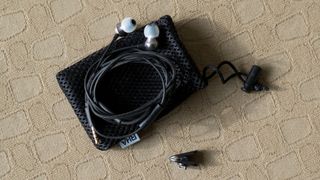
We were pleasantly surprised to see how many accessories RHA shipped with the MA390. The package includes a variety of ear tips, a shirt clip, and a mesh carrying pouch. 
RHA MA390

Performance

Sound quality of the RHA MA390 can be summed up by two words: warm and soft. Audiophiles will not be impressed with its sound but audiophiles won’t be buying $30 headphones. For most listeners, though, the RHA MA390 will sound just fine and many may prefer its bass-heavy sound. 
Bass is what stands out the most about the RHA MA390’s sound signature, for better or worse. Bass response bleeds into the mids, which means these aren’t the best for vocal music. However, the intense bass impact make the RHA MA390 fun for listening to pop, hip hop, and electronic music. 
Highs are rolled off, which means you won’t get the ultimate detail in the upper audio spectrum. However, it also means that you won’t be fatigued from long listening sessions. The slightly more expensive RHA S500u has more revealing highs, but some listeners may find this slightly sibilant and fatiguing. The softness of the RHA MA390 may not be the most revealing but you’ll be able to listen for hours without discomfort. 
Interestingly, the RHA MA390 feature a wider soundstage to our ears than the more expensive RHA S500u. However, the S500u sound slightly better in all better aspects like tonal balance and resolution.
RHA MA390

Verdict

The RHA MA390 are an impressive pair of budget headphones that, while not perfect, offer much more than you’d expect: They’re built like a tank, feature a ton of accessories, and its sound signature is bass-heavy and fun. Audiophiles won’t like the MA390, but the audiophile audience isn’t buying budget headphones in the first place. The RHA MA390 are budget headphones that sound great and can put up with abuse. 
If you’re looking for slightly better sound quality but are still on a tight budget, the RHA S500u offer better tonal balance and resolution for only slightly more money. The excellent 1MORE Triple Driver headphones are also an excellent choice for those who can stretch the budget to $80. 
For the money, the MA390 offers a premium build and a ton of accessories. While its bass-heavy sound may not be to everyone’s liking, those who want a fun sounding headphone for pop, hip hop and electronic music will be pleased.