Impressive though they are in many (though not all) ways, Samsung’s new QLED TVs don’t come cheap. Just as well, then, that Samsung has provided a handy ‘Plan B’ in the shape of its MU series.
We recently looked at and were impressed by the great value
UN49MU6400(confusingly named the MU7000T in the UK). Not surprisingly, then, we’re feeling pretty excited by the arrival on our test benches of the step-up UN55MU7000 (called the MU8000 in the UK). After all, this 55-inch costs more and boasts more powerful picture technology, so it’s got to be substantially better, right?
Design
SAMSUNG MU7000 / MU8000 SPECS
Screen sizes available: 49-, 55-, 65-, 75-inches
Tuner: Freeview HD
Panel technology: LCD
4K: Yes
HDR: HDR10 + HLG
Smart TV: Eden
Curved: No
Dimensions: 1229.4 x 795.3 x 351 mm (HxWxD inc stand)
3D: No
Inputs: 4 x HDMI, 3 x USB, Ethernet
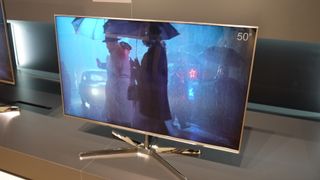
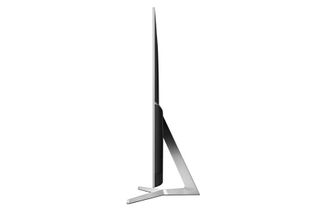
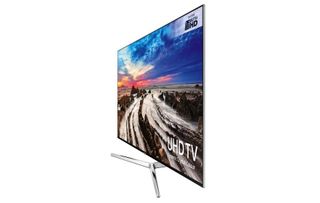
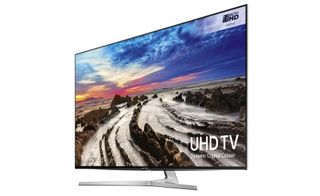
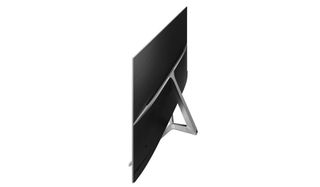
The UN55MU7000 is one of 2017’s most attractive LCD TVs. It’s impressively slim for a non-OLED panel, and its screen frame’s combination of an ultra-thin glossy black frame and outer metallic silver trim looks and feels much more premium than the finish of the UN49MU6400.
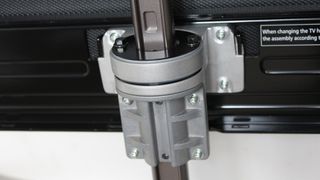
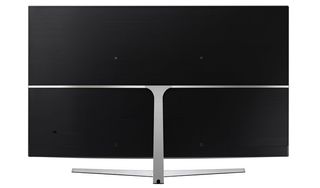
Its metallic boomerang-shaped desktop stand is also a more attractive option than the spindly legs tucked under each bottom corner of the MU6400 sets. The UN55MU7000’s central stand is more practical too, since it means you don’t need to place it on a piece of furniture as wide as the screen like you do with the MU6400.
For people who care about what the back end of their TV looks like, the UN55MU7000’s got you covered there too. Its grey, horizontally lined back panel looks crisp and smart, and is relatively uninterrupted by the usual connections. This is because the UN55MU7000 uses an external connection box to minimise the cable spaghetti running into the TV.
This box carries four HDMIs, a tuner input, three USBs and the now de rigueur Ethernet and wireless Wi-Fi network options.
The trim, comfortable smart remote control deserves a shout in this section for the impressive way it reduces the button count of the main handset while also carrying a mic to support the TV’s voice control system.
The smart remote also has ambitions of being a universal remote capable of automatically taking over control of all your source equipment. You don’t even need to programme it; the TV automatically recognises your source equipment and uses that information to programme the smart remote for you. In truth, though, we’ve never found trying to remember which button on the smart remote works which feature of our source gear as easy as just picking up each external source’s separate remote!
Design TL;DR: The UN55MU7000 treads just the right line between delivering a ton of clutter-free style without drawing undue attention to itself.
Smart TV features
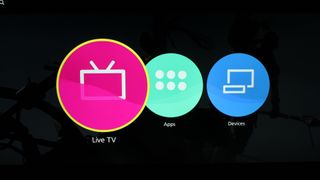
The second generation of Samsung’s so-called Eden smart TV platform provides an impressively refined and efficient interface. Its home screen restricts itself to a couple of layers of compact icons so that you can use it while still watching TV. The way the top layer provides contextual direct content link icons based on what you’ve chosen in the bottom engine makes for a slick, logical structure too.
It’s also easy to re-organise the order of the home screen apps so that your favourite ones appear first, and the amount of apps available to you is prodigious. They include, fortunately, all the big video hitters most people will need: Netflix, Amazon Video, and the catch-up platforms for all of the UK’s main terrestrial broadcasters. Netflix and Amazon both support 4K and HDR streaming.
Unlike most other TV brands these days, Samsung doesn’t provide the UK’s terrestrial broadcast catch-up apps in a Freeview Play or YouView ‘wrapper’, denying you those platforms’ 7-day back electronic programme guide interface. Personally, though, we haven’t found this a great hardship given how intuitive the latest version of Eden 2.0 is.
One last key element of Eden 2.0 is its brilliant voice recognition system. This lets you control pretty much every feature on the TV by saying just one or two words; a far cry from the early days of voice control where you had to learn entire new sentence structures and lose all trace of a regional accent if you wanted the TV to have a better than even chance of ending up where you wanted it to end up.
Smart features TL;DR: A user-friendly and customisable interface makes it easy to access a strong range of online content. Especially if you spend a few minutes getting used to the idea of talking to your TV.
Even though the UN55MU7000 is all about HDR and 4K, that doesn’t mean it can’t deliver the goods with the HD and standard dynamic range (SDR) sources most of us mere mortals will still find ourselves watching for most of the time.
On the contrary, the UN55MU7000 is outstanding with whatever SDR content you throw at it. For starters, it converts HD sources to its native 4K resolution exceptionally well. Pictures look markedly sharper and more detailed, yet this is achieved without the picture looking processed or unnatural. Edges don’t look over-stressed and grain isn’t distractingly exaggerated - thanks to the upscaling’s ability to spot the difference between true picture content and source noise. The only qualification we’d add is that you need to make sure the TV’s Sharpness setting is no higher than its 30-35 level if you want upscaled pictures to look their best.
The UN55MU7000’s HDR-friendly brightness also gives SDR pictures plenty of punch, especially since its combination of a VA-type LCD panel and locally dimmed edge LED lighting helps it produce deep but also insightful black levels. These provide an engaging foundation for the screen’s SDR colours, helping them to look natural, rich and subtly detailed, even in the darkest corners.
One final point to mention here is HDR+. Not to be confused with the recently announced
HDR10+ format for adding active metadata to the HDR10 industry standard, HDR+ is Samsung’s system for converting SDR content into HDR. This is easily the most aggressive HDR conversion system currently found in the TV world, injecting huge amounts more brightness and colour punch into SDR pictures.
While many will enjoy the way HDR10+ enables them to use the TV’s full brightness and colour capabilities all the time rather than only when watching HDR content, Samsung’s aggressive approach can leave some colours looking rather unnatural and some bright areas looking a bit bleached. The system can also exaggerate source noise, especially MPEG compression artefacts in the dark areas of digital broadcasts. So while you can and should try HDR+, be aware that it certainly comes with strings attached.
HD/SDR Performance TL;DR: Provided you take a little care with its settings, the UN55MU7000 is an impressive performer with HD and SDR content.
The UN55MU7000 claims to be capable of hitting brightness peaks of around 1000 nits, and delivers a measured brightness on a 10% (of screen size) white HDR window of around 650 nits. These numbers are both higher than you would normally expect to find on such an affordable 55-inch 4K LCD TV, and help the UN55MU7000 deliver a punchier, more full-on high dynamic range image than you usually get at this price.
It’s particularly great to see really bright parts of HDR images not only popping off the screen with beautifully life-like impact, but also containing more subtle shading and detail than budget TVs usually manage.
This high brightness also enables the TV to deliver a sense of the wider colour range associated with HDR sources, and helps elucidate some impressively subtle colour detailing in both bright and dark parts of the HDR picture.
The UN55MU7000’s use of a local dimming system means its edge LED lighting can combine the bright HDR stuff with decent black levels too. Though to be clear on this point, there are other sets out there - most notably
Sony’s XE9005series - that trade a little brightness for much deeper black levels with very watchable results.
Comparing the UN55MU7000’s handling of dark HDR scenes with Samsung’s own MU6400 series produces some interesting results, too. While the UN55MU7000 gets a little darker with its black levels, the level of difference isn’t as pronounced as you might expect given it brings local dimming to the table. There’s still a distinct grey wash over everything, and the UN55MU7000 also introduces some localised backlight inconsistencies you don’t get with the MU6400 series.
To some extent, of course, since they use external lights to illuminate their pixels, no LCD TV will be able to deliver the sort of HDR-aiding brightness levels the UN55MU7000 provides without compromising black level performance. It’s true, too, that the relatively subtle impact of the local dimming system means the picture doesn’t throw up many of the distractingly stark backlight bands associated with more aggressive local dimming engines. But we would have still expected a slightly more pronounced contrast improvement between the MU7000 and the MU6400.
When it comes to rendering 4K, the UN55MU7000 is a chip off the impressive Samsung block. Be it a 4K Blu-ray or a high quality 4K stream, it looks pin sharp and full of HD-thrashing detail. There’s a greater sense of depth to 4K images too, as usual, and colours generally benefit from the extra blend definition having so many pixels to work with can deliver.
You do need to limit the sharpness setting to around its 35-40 level to stop the extreme detailing starting to shimmer with noise. So long as you do that, though, you’ll usually be left marvelling at just what a difference a good 4K picture can make.
A combination of minor judder or processing flaws in the set’s handling of motion (depending on whether you’re using the motion processing or not) can reduce the 4K clarity a little during sport or action scenes. Though actually, the UN55MU7000 does better in this respect than most similarly priced rivals.
There are a couple of other flaws to report though. First, colours look a touch thin with bright HDR content. This suggests that the sort of brightness the UN55MU7000 delivers benefits from more wide-colour pixel systems of the sort QLED’s Quantum Dots can provide.
Second, the UN55MU7000’s pictures break down if you have to watch it from an angle of more than 30-35 degrees. Black levels and colour saturations reduce, and you become more aware of light banding from the local dimming system.
4K/HDR performance TL;DR: Aside from not quite upping the contrast ante as much as we’d like, the UN55MU7000 does a better job than most TVs in its price bracket of making the most of 4K and HDR’s charms.
Sound Quality
Considering how slim its bodywork is and that its design doesn’t include any visible speakers, the UN55MU7000 doesn’t sound bad at all. It doesn’t exactly shake your foundations with its bass levels, and its maximum volume might not be enough to satisfy very large rooms. However, it sounds clean, detailed, and enjoyably dynamic in the mid and treble ranges, and it does a surprisingly effective job of making voices sound well rounded and convincing.
You might want to consider adding a good soundbar to the TV at some point, perhaps, but it’s not something you’ll have to rush to do.
Sound quality TL;DR: The UN55MU7000 sounds better than you’d expect, and good enough to make adding an external sound system a luxury rather than a necessity.
Other panels to ponder
If you can find just a little more, you could bag yourself
Sony’s KD-55XE9305. This uses an innovative new backlight system that uses two LCD light plates in sequence, providing twice as much local control over where light appears in the picture. This approach can occasionally cause some noticeable ‘squared off’ light clouding around very stand-out bright objects, but at the same time it enables the 55XE9305 to get more than twice as bright as the UN55MU7000 while also delivering some punchy black tones.
Sony also provides some strong competition for almost the same money as the UN55MU7000 in the
55XE9005. This falls short of the Samsung on the all-important (for HDR) brightness front, but its use of a direct LED lighting system, where the lights sit directly behind the screen rather than around its edges, helps it deliver deeper, more consistent black levels during dark scenes. This is particularly important if you’re fond of watching films with the lights down.
Finally, ironically we think the UN55MU7000 is placed in a slightly difficult position by its own
UN55MU6400 (MU7000 in the UK) Samsung siblings. Although it doesn’t go quite as deep with its black levels or quite as bright with its light peaks the difference isn’t as extreme as you might expect considering the MU6400 model is substantially cheaper at the time of writing. Also, the more uniform look to the MU6400’s backlighting during dark scenes, presumably due to it not using local dimming, arguably makes its pictures more consistently immersive, if less dynamic.
Verdict
The UN55MU7000 is a good television. Its brightness advantage helps it reach HDR parts other similarly priced rivals cannot - something which also makes it a strong option for bright living rooms.
It’s just a shame it doesn’t take more advantage of its local dimming system to deliver a stronger boost in picture quality over Samsung’s own, substantially cheaper MU6400 range.